MARKETING AUTOMATION TOOLS
Automations that put AI and email to work for you
Mailchimp is a marketing partner who helps you spot what to send next, then builds the flow so you can review and launch.
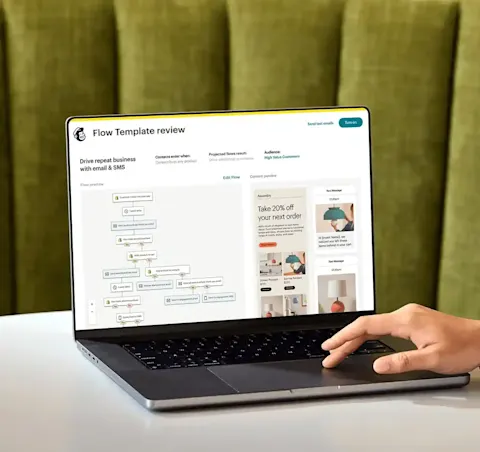











Unify your data for an organized, holistic, and always up-to-date view of your customers
Fuel e-commerce growth with new automations
Proactively reach customers when they're ready to buy or churn with predictive automations that drive revenue.
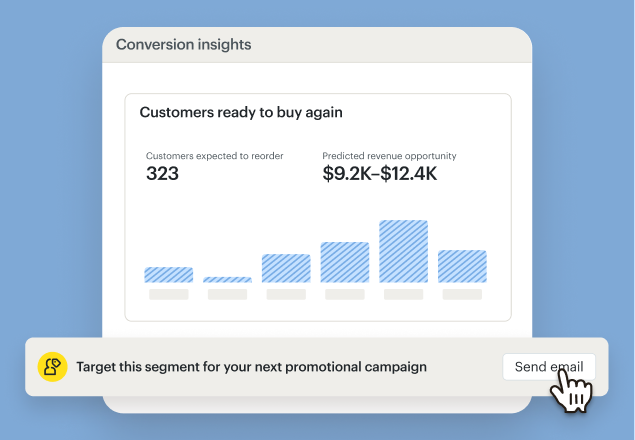
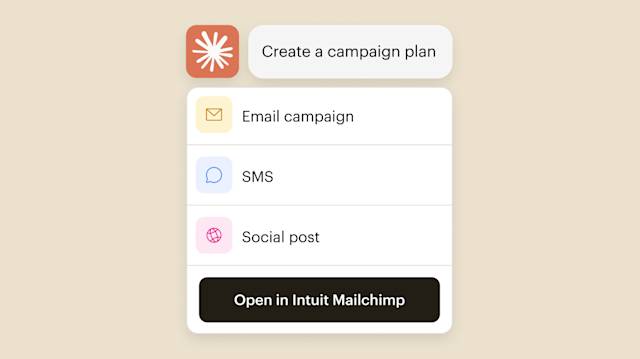
Capture data from more sites with the one-click pixel
The Mailchimp site tracking pixel now supports Wix, WooCommerce, and custom sites as well as Shopify. The best part? You can install it in just one click.
Mailchimp’s SMS platform is more powerful than ever
We’re introducing new enhancements to our SMS marketing tools all the time—so you can keep growing and outpacing the competition.

Get started with a personalized tour
Schedule a call with an onboarding specialist at any time during your first 90 days to help you get started with confidence—it’s already included with Standard and Premium plans.*
Onboarding services video
Capture what your customers want and take action—automatically
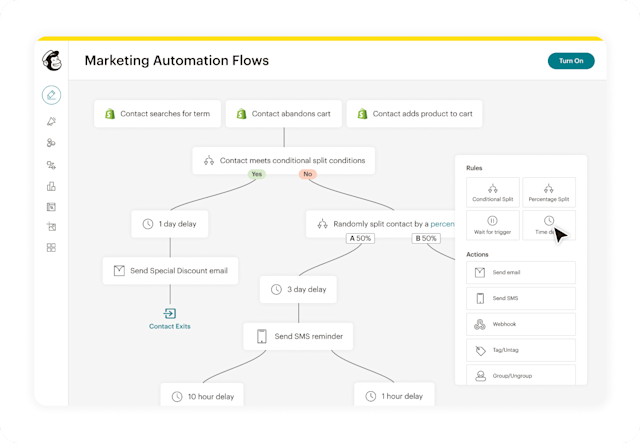
Drive revenue by automating the whole customer flow
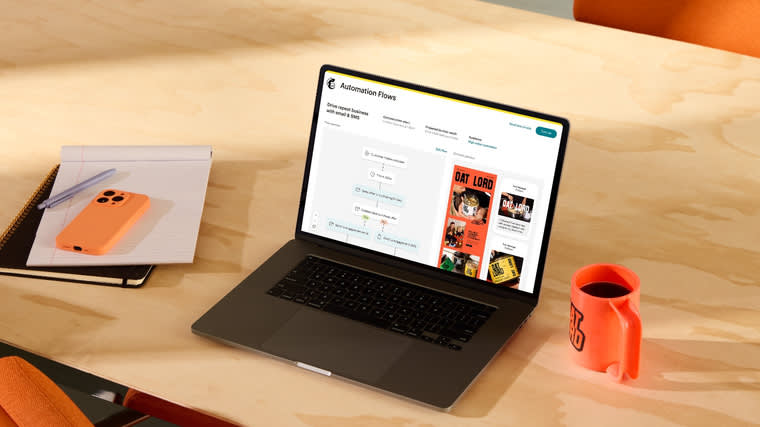
Drive repeat business, retain customers, reward big spenders, and more with automations. Marketing automation flows generated up to 8x more orders for users with connected stores than bulk emails.*

“The Mailchimp + Zapier integration allows us to save time and also allows us to accurately segment the audience that we wish to target and just makes everything seamless.”
Shapeways Louise Lau, Performance Marketing Manager
283% Open rate increase
525% Click-through-rate increase
Extend your reach beyond email in a few clicks
Build relationships with marketing automations
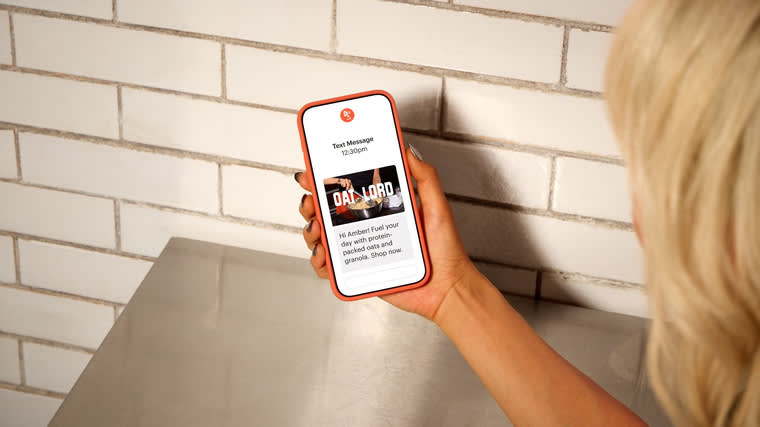
Engage your customers across channels that matter most to them, and drive higher returns. Using Mailchimp, you can create seamless omnichannel campaigns across email, SMS*, social, and more.


What's new in Mailchimp?
Deliver personalized experiences over email & SMS with advanced generative AI and marketing automation flows
FAQs
-
Yes, Mailchimp offers marketing automation, which allows you to personalize customer journeys, send trigger-based emails, and more. You can also send automated messages to customers that are uniquely tailored to their interactions with your business. Plus, you don’t have to be online, so you can send more emails at the right time and focus on other important matters. Whether you want to send an email after a user signs up or purchases a product, the right tools can help you keep the conversation going.
-
You can’t edit campaigns that have already been sent out via Mailchimp. However, if you haven’t hit the send button yet or the campaign is paused, you can set a schedule for it. Simply select the email campaign you want to work on and change the triggers, edit the schedule, alter the segment, or set a post-sending action.
Make sure to click “Resume” once you’re done making changes.
-
To set up marketing automation, you’ll first have to connect your store to Mailchimp. This way, you can leverage important customer data to send engaging emails. It’s also good to know which Mailchimp plan you have. The Free plan only allows you to set up a single email automation, so you can enable welcome emails for new users or send a birthday email on a customer’s special day. On the other hand, you can create an automated workflow for the whole customer journey with the Standard and Premium packages.
Once you’ve completed the steps above, you can head over to the Automations icon, click the “Create” tab, and select “Classic Automation.”
-
Automated marketing refers to using technology to reduce the creation of manual emails. So, instead of composing an email after a customer abandons their cart or makes a purchase, you can let the system handle it for you. As a result of automated campaigns, potential customers and current clients can receive emails in relation to where they are in the customer journey.
Not only can this help shoppers remain engaged with your brand, but it can also allow you to create loyal customers. After all, 80% of consumers are more likely to purchase from brands that create personalized experiences.
-
To set up a few marketing automation campaigns, you’ll need to decide how often to send emails and define the trigger. Preset automations often have triggers already defined, so you’ll only worry about creating the content for the email. However, custom automations require you to indicate the trigger.
Make sure your automated marketing campaigns sound human and go to the right people. Emails that are too focused on landing the sale or sound robotic can scare off prospects. Instead, focus on crafting automated emails that naturally communicate your message while moving consumers onto the next step in the sales journey.
-
Marketing automation encompasses a range of automated processes and strategies to streamline marketing efforts. Major types of marketing automation tools include:
- Email marketing automation: Setting up triggered emails based on specific actions or events, such as welcome emails, abandoned cart reminders, or personalized follow-ups. Mailchimp offers robust email automation capabilities, allowing you to create and schedule automated email journeys tailored to your subscribers' behavior.
- Lead nurturing automation: Guiding potential customers through the sales funnel by delivering targeted content and communications. Mailchimp provides tools to segment your audience, personalize messages, and automate the delivery of relevant content based on subscriber preferences, demographics, or engagement levels.
- Social media management automation: Scheduling and publishing posts across various social media platforms and tracking engagement across multiple channels. Mailchimp allows you to connect your social media and email campaigns by creating social posts right in the email builder, and reuse design assets from your other marketing while keeping your messaging consistent. You can also share your email newsletter to social media from your sent campaigns with a link, allowing you to reach more people with content you’ve already developed.
- Workflow automation: Workflow automation involves automating internal marketing processes and tasks, such as assigning leads to sales representatives, tracking campaign performance, or managing customer data. Mailchimp's audience-focused journey and workflow tools provide powerful automations like ad retargeting, drip campaigns, and audience segmentation.
- Customer Relationship Management (CRM) automation: CRM automation involves integrating marketing automation with customer relationship management software to streamline customer interactions, track customer journeys, and improve customer relationships. Mailchimp's customer experience (CX) automation features allow you to orchestrate existing customer data to determine where automation is necessary and most valuable, and communicate with clients when it makes sense.
-
Marketing automation tools streamline marketing processes and tasks while helping businesses manage and execute marketing campaigns more efficiently. Here are some key features of the best marketing automation tools:
- Email marketing: Allow businesses to create, send, and track email campaigns. These tools provide email templates, automation workflows, subscriber management, and analytics to optimize campaign performance. (We think Mailchimp is pretty great at this, but we're biased.)
- Campaign management: Help keep track of various marketing campaigns across different channels. They enable businesses to plan, execute, and monitor campaigns from a single place, providing insights and analytics to track campaign effectiveness. Campaign management tools like Mailchimp offer features like campaign scheduling, audience segmentation, A/B testing, and performance reporting.
- Lead management and nurturing: Follow leads throughout the customer journey. They provide lead capture forms, lead scoring, and lead nurturing capabilities to engage and convert prospects into customers. These tools enable businesses to automate personalized interactions, track customer behavior, and deliver relevant content based on specific triggers or actions. Mailchimp enables this through features like customer journey maps, drip campaigns, and user data orchestration.
- Analytics and reporting: Marketing automation tools often provide robust analytics and reporting features to measure campaign performance, track key metrics, and gain insights into audience engagement. These insights help businesses refine their marketing strategies and make data-driven decisions.
Businesses should choose tools that align with their specific needs and scale as their marketing requirements evolve. Mailchimp's marketing automation platform offers a wide range of features and functionalities to support email marketing, audience management, automation workflows, and analytics for businesses of any size.
-
One example might be the process of setting up an abandoned cart email campaign for an e-commerce store. When a customer leaves items in their cart without completing the purchase, Mailchimp can trigger automated emails to remind and incentivize them to return and complete the transaction. This marketing strategy helps businesses recover potentially lost sales by sending targeted and timely emails automatically.
The most common forms of marketing automation tools are simple engagement-based forms of communication. Anniversary and birthday cards and appointment reminder emails fit into this category. Emails that include surveys and feedback requests can be executed with marketing automation as well.
Other examples of marketing automation tools include trigger campaigns which help nurture leads throughout the buyer’s journey with various content assets, including, editorial posts, promotions, e-books, guides, and more.
-
Marketing automation tools are designed to enhance your marketing efforts while also making them more efficient. When you create automated campaigns, you can market in an effective way while gaining time back to focus on other business development efforts.
-
Marketing automation tools allow you to use a digital platform to consistently and efficiently market your products. By performing the repetitive tasks for you, it allows you to be more productive in other ways and also gives you a chance to work directly with your customers.
With that said, marketing automation platforms depend on quality information. Each time someone subscribes to your list, buys something from your store, or clicks on your ads, they’re providing you with valuable data.
If you use Mailchimp as a marketing automation tool, your contact data is all in one place so you can get a holistic view of your audience as a whole. It also offers a visual breakdown of data—like where your contacts are located, how often they engage with your emails, and more insights—that you can turn into a map that will guide your customers to take the desired action at different interaction points.
-
If you're hesitant about investing in marketing automation tools, you may wonder what they can do for you.
With most marketing automation tools, you can ensure your sales and marketing teams work better together to deliver targeted campaigns your audience actually cares about. This type of tool can also enhance audience segmentation, A/B testing, lead qualification, and data analytics.
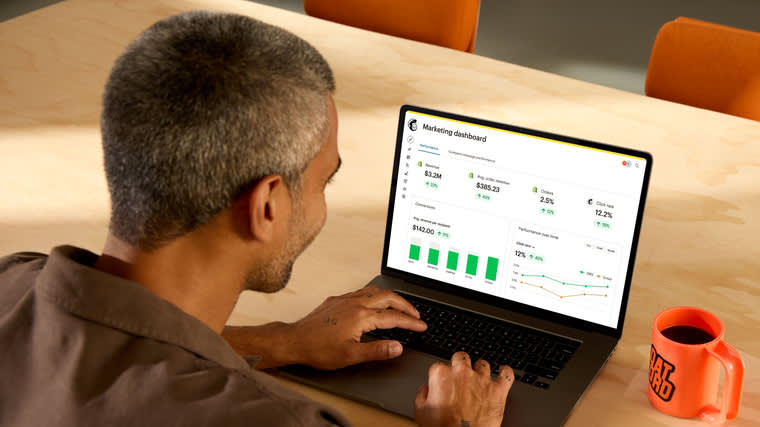
Data analytics is a crucial part of the marketing automation process. It lets you see what’s working in your marketing efforts and what isn’t. This enables you to discover what's relevant to your customers and apply that to your strategy. As such, you can use the data gathered by marketing automation tools to adjust your marketing strategy and boost results. You can also uncover the efficiencies in your market segments and what’s most important to drive sales. Then, by leveraging these efficiency gains, you can increase leads and your bottom line.
You can achieve your desired business outcomes by streamlining marketing tasks, increasing productivity, and enhancing efficiency. The extra effort and time it takes to complete repetitive tasks, such as keeping track of campaigns, monitoring leads, and posting compelling advertisements, will be reduced or eliminated by marketing automation tools.
A marketing automation platform can even help you automatically send emails at specific times or when certain conditions are met. For example, you can send an automated email to a shopper who added items to their cart but never finalized their purchase. These types of emails are known as abandoned cart messages and can remind a consumer of the products they left behind, which helps keep your business top-of-mind. You may even add a discount code to this correspondence to encourage them to buy.
Regardless of how you use marketing automation tools, you can help your team save time and make it easier for them to focus on other crucial tasks that require their attention.
Marketing automation related topics
-
Build Better Customer Journeys with Omnichannel Marketing
Connect every touchpoint and turn scattered interactions into seamless customer experiences with omnichannel marketing.
-
Advanced Segmentation: Target the Right Audience
Move beyond basic lists with advanced customer segmentation. Use nested logic, unlimited conditions, and behavioral triggers to send the right message at the right time.
-
How to Improve Revenue With Email and SMS Automation
Maximize your ROI by integrating your messaging. See how email and sms marketing automation flows work together to create seamless customer journeys that increase sales and loyalty.
-
Use Win-Back Campaigns To Re-Engage Users
Stop losing customers to churn. Learn how to build a re-engagement campaign and send win-back emails that bring inactive subscribers back to your brand.

Millions of users trust us with their email marketing. You can too.
*Disclaimers
- SMS Marketing: SMS is available as an add-on to US or UK paid plans only. Application and agreement to terms is required before purchasing credits. Messages can only be delivered to contacts in the country selected. SMS credits are added to your account after purchase and approval. Credits are issued monthly and unused credits expire and do not roll over. MMS only available when sending to US contacts with US Standard and Premium plans. Pricing varies. See terms for details.
- Onboarding services differ per plan and are available for new or upgraded users with a paid plan for the first 90 days after account creation or upgrade. Onboarding services are currently offered in English, Spanish and Portuguese for Premium plans, and in English for Standard plans.
- 8x orders: Based on orders generated from bulk emails of paid plan users across all available geographics from January 2023 - January 2025. Customer Journey Builder (CJB) was rebranded to Marketing Automation Flows (MAF) effective as of June 2025. Any references to “Automation Flows” refers to the same features previously available under CJB. Features and functionality vary by plan type. For details, view Mailchimp’s various plans and pricing.
- 9x revenue: Based on total revenue generated from bulk emails by users’ of Marketing Automation Flows from January 2023 - January 2025. Customer Journey Builder (CJB) was rebranded to Marketing Automation Flows (MAF) effective as of June 2025. Any references to “Automation Flows” refers to the same features previously available under CJB. Features and functionality vary by plan type. For details, view Mailchimp’s various plans and pricing.
*Free Trial Terms: No Credit Card Free Trial: If you are on a Free Trial of the Standard or Essentials plan (each a “Paid Marketing Plan”) that did not require a credit card at sign up, you can send up to 100 emails including bulk sends and automation sends. Adding your credit card during your Free Trial unlocks your plan’s full email sending limits based on your contact tier. Once your Free Trial ends, your credit card will be charged monthly or annually at the current rate for your chosen Paid Marketing Plan (based on your contact tier and email sends) unless you delete your Mailchimp account, change plans, or change to a Free Marketing Plan. Adding SMS Marketing to your marketing plan during your Free Trial requires a credit card and also unlocks your plan’s full email sending limits based on your contact tier for the duration of your Free Trial. SMS Marketing fees are not included in the Free Trial and you will be charged for the SMS credits you purchase once your SMS application is approved during your Free Trial. See full offer terms. Terms, conditions, pricing, special features, and service and support options subject to change without notice.
†Free Trial Terms: The first fourteen (14) days of subscription to Mailchimp Standard or Essentials (as applicable, each, a “monthly plan”), starting from the date of enrollment, is free (“Free Trial”). Valid payment information must be provided at the time of enrollment. You will be notified via e-mail of the approaching expiration of your Free Trial prior to the expiration date. To be eligible for the free trial offer, you must be a new Mailchimp customer or an existing Free Marketing Plan customer with an account created within the last 90 days in select countries and sign up for a Standard or Essentials plan using the "Start Free Trial" option (or similar wording). Offer is limited to one per Mailchimp account and cannot be combined with other Mailchimp offers and offers are not eligible to be applied consecutively. Offer is available for a limited time only and does not apply to add-on fees or one-time fees, including but not limited to transactional email (fka Mandrill) charges, SMS Marketing, Website plans, pay as you go credits, or Google ads. Once the Trial Period ends, you will be charged on a monthly or annual basis, as applicable, at the then-current rate for the paid marketing plan you have selected based on your contacts and emails sends until you cancel, change to a different paid monthly or annual marketing plan, or change to a Free Marketing Plan. If you purchase an annual Paid Marketing Plan while on a free trial, your free trial will immediately terminate upon purchase. See full offer terms. Terms, conditions, pricing, special features, and service and support options subject to change without notice.