Commerce7 + Mailchimp: Winery Marketing Made Simple
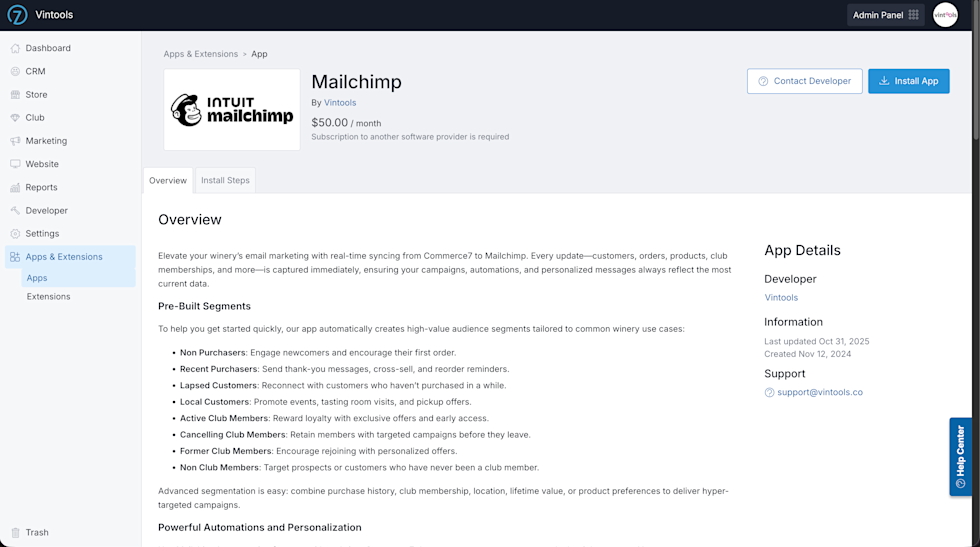
Elevate your winery’s email marketing with real-time syncing from Commerce7 to Mailchimp. Every update—customers, orders, products, club memberships, and more—is captured immediately, ensuring your campaigns, automations, and personalized messages always reflect the most current data.
Pre-Built Segments
To help you get started quickly, our app automatically creates high-value audience segments tailored to common winery use cases:
- Non Purchasers: Engage newcomers and encourage their first order.
- Recent Purchasers: Send thank-you messages, cross-sell, and reorder reminders.
- Lapsed Customers: Reconnect with customers who haven’t purchased in a while.
- Local Customers: Promote events, tasting room visits, and pickup offers.
- Active Club Members: Reward loyalty with exclusive offers and early access.
- Cancelling Club Members: Retain members with targeted campaigns before they leave.
- Former Club Members: Encourage rejoining with personalized offers.
- Non Club Members: Target prospects or customers who have never been a club member.
Advanced segmentation is easy: combine purchase history, club membership, location, lifetime value, or product preferences to deliver hyper-targeted campaigns.
Powerful Automations & Personalization
Use Mailchimp’s automation features with real-time Commerce7 data to engage customers at exactly the right moment. You can create:
- Abandoned cart reminders
- Welcome series for new subscribers
- Club member welcome flows personalized by tier and delivery method
- Post-purchase upsells and recommendations
- Reorder reminders
- Win-back campaigns for lapsed buyers
- Birthday or special occasion emails
These are just a starting point—you can also leverage Mailchimp’s extensive library of prebuilt automations or create custom flows tailored specifically to your winery, products, or customer behavior. With your data synced in real-time, you can deliver highly relevant messages that drive engagement, loyalty, and repeat purchases.
Privacy & Compliance
Our integration is built with compliance and customer trust in mind. You can choose from multiple consent options to ensure your marketing aligns with your winery’s policies and your customers’ preferences:
- Explicit Consent (Recommended): Customers must actively opt in to receive marketing emails. This is the safest option for full compliance.
- Explicit or Implied with Club Membership: Customers who are part of a club are automatically considered opted in, while others must explicitly consent.
- Explicit or Implied with Purchase/Club Membership: Customers who have made a purchase or are in a club can be opted in automatically
While implied consent options allow customers to be synced to Mailchimp as subscribed, any unsubscribe actions taken in Commerce7 or Mailchimp will always be honored, ensuring that all marketing preferences are respected.
Seamless Onboarding
Getting started with our Mailchimp integration is simple. Connect directly from Commerce7 from the Mailchimp tab under Marketing—no API keys or technical steps required.
Once connected, all your Commerce7 data is automatically synced into Mailchimp. Historical data is included, so you can take advantage of advanced segmentation, automations, and personalized campaigns without any manual imports.
Next-Level Reliability
Built on modern serverless technology, our integration scales automatically with your traffic. Thousands of updates per second are captured in real time, keeping your audience accurate and campaigns timely—even during your busiest moments.