


AUDIENCE MANAGEMENT TOOLS
Audience segmentation tools that help you personalize every campaign
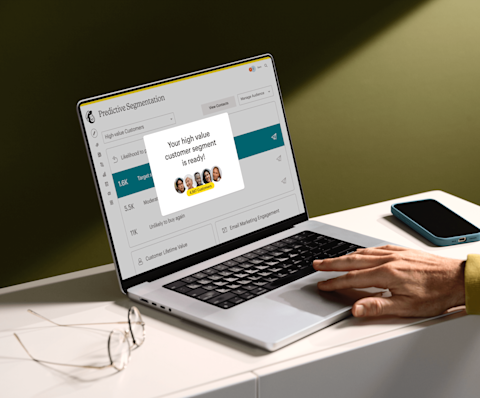
Mailchimp’s audience tools help you store, segment, and understand your customers to deliver the most relevant personalized experiences.
-
#1
email and marketing automation platform*
-
8 million
data-backed recommendations with AI-powered features*
-
500 million
emails sent each day on average
-
>99%
deliverability rate (average)
Put your audience at the heart of your marketing

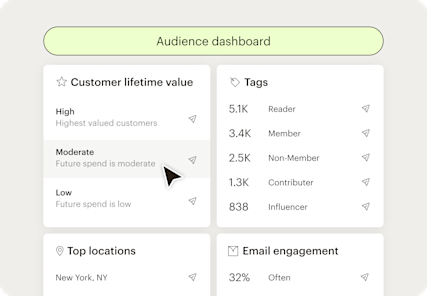
Leverage data to understand your customers
Identify patterns among your most valuable contacts with real-time insights into behavior, interests, engagement, and purchase activity.
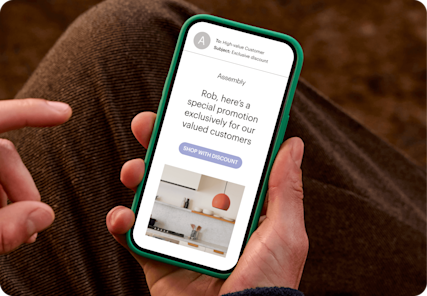
Personalize marketing campaigns with segments based on customer data
Send the right message every time with targeted segmentation that leverages your contacts’ engagement and behavioral data.
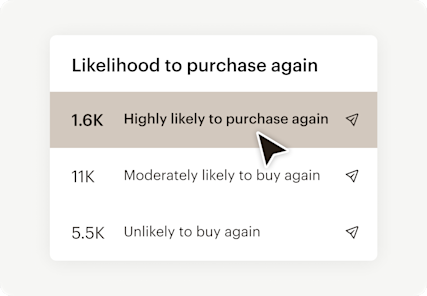
Use predicted insights to drive customer loyalty
Drive repeat business by targeting contacts based on predicted demographics and e-commerce behavior.
"Segmentation in Mailchimp is pretty straightforward, and using it has allowed us to better target groups with different campaigns. Better targeting has allowed us to achieve improved results."
Lauren Korus, Content Manager, Vacation Races US
Reach the right customers at the right times
Drive engagement with customer segmentation tools
Mailchimp's email platform helps predict customer behavior. See up to 2x more revenue with Predictive Segments*, available on Standard and Premium plans.*
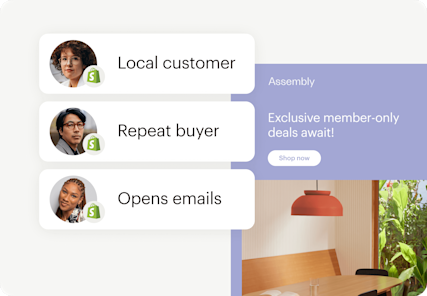
Integrate customer data to power campaigns
Connect your store and take advantage of data-driven
e-commerce features to help you understand your audience, generate purchases, and create lasting customer relationships.
Get up and running easily with personalized onboarding services
Get guided support from an onboarding specialist—available with a Standard or Premium plan.
Onboarding services video
Before you start
Here are some terms to know before you begin creating audience segments—and what you can do with them.
-
Audience
Your audience is where you can store, organize, and manage all your contact data.
-
Tags
Tags are labels for your contacts that you can use to organize your audience based on what you know about them.
-
Segments
Segments let you send to targeted lists based on contacts’ real-time engagement, shopping, and website data.
-
Groups
Use sign-up forms to ask your contacts about what they're interested in, and to organize them into groups.
Get started today
†See Free Trial Terms and Offer Terms.
Overagesapply if contact or email send limit is exceeded. Free plan sending will be paused if contact or email send limit is exceeded. Learn more.
Learn more about audience management
FAQs
-
Audience segmentation is the practice of dividing your contact list into subgroups based on shared characteristics like demographics, location, purchase history, behavior, or psychographics. Rather than sending the same message to everyone, you deliver more relevant content to the people most likely to respond.
Mailchimp's segmentation tools make it easy to identify those subgroups and act on them automatically, across email, SMS, ads, and more.
-
There are several main types of segmentation, and Mailchimp supports all of them through tags, pre-built segments, and predictive tools. These include:
Demographic segmentation: Grouping contacts by age, gender, income, or job title. This is one of the most common starting points for targeted campaigns. Geographic segmentation: Organizing your audience by country, region, or city so messaging reflects where people actually are. Psychographic segmentation: Dividing contacts based on values, interests, or lifestyle to reach what motivates them, not just who they are. Behavioral segmentation: Grouping people by how they interact with your brand, such as purchase frequency, email engagement, or product usage. Needs-based segmentation: Organizing contacts around what they’re actually trying to accomplish or solve. This approach focuses on intent rather than identity, making it useful for B2B audiences and service-based businesses.
-
Customer segmentation tools are software platforms that identify and group customers based on shared data, like demographics, purchase behavior, engagement, and interests. They typically include analytics platforms, CRM systems, and behavioral tracking tools.
Mailchimp's customer segmentation tools combine all of these functions in one place, so there's no need to manage separate software to build and act on your segments.
-
Customer segments are distinct groups of contacts organized by shared characteristics. Unlike tags, which label individual contacts, segments group them dynamically based on set criteria. In Mailchimp, customer segments update in real time as contact data changes, so your targeting stays accurate without manual upkeep.
-
Email segmentation means dividing your subscriber list into groups based on criteria like behavior, location, or purchase history, then sending campaigns tailored to each group. Segmented campaigns see 23% higher open rates and 49% higher click-through rates compared to unsegmented sends. Mailchimp's email segmentation tools help you send the right message to the right person, and the data shows it consistently drives better results.
-
Audience segmentation improves nearly every part of your marketing performance. Here's what you can expect with Mailchimp's audience segmentation tools:
Better targeting: Contacts receive content that reflects their actual behavior, which drives stronger engagement. Higher open and click rates: Segmented campaigns outperform batch-and-blast sends across every major metric. Increased revenue: Predictive segments deliver up to 2x more revenue for e-commerce senders. Fewer unsubscribes: Relevant messaging keeps people on your list longer. Stronger loyalty: Consistent, personalized communication builds trust over time.
-
Effective segments start with knowing your contacts. Here are the steps to build segments that work in Mailchimp:
Identify key characteristics: Review engagement data, purchase history, and contact profiles in Mailchimp's audience dashboard. Choose your method: Use tags for manual grouping, pre-built templates for common use cases, or custom criteria for more specific targeting. Test and refine: Use campaign reports to measure segment performance and adjust criteria as needed.
-
Mailchimp's predictive segmentation uses machine learning to analyze and create segments using past purchase behavior and predict customer lifetime value, labeling contacts as high, moderate, or low value. It surfaces patterns that are difficult to spot manually and powers more than 8 million data-backed recommendations annually.
AI-powered audience segmentation is available on Standard and Premium plans.
Need to hire a helping hand? We got you.
From a quick template design to full-service campaign management, our global community of 850+ trusted experts does it all.

Millions of users trust us with their email marketing. You can too.
*Disclaimers
- #1 email marketing platform: Based on December 2023 publicly available data on competitors' number of customers.
- 8 million+ data-backed recommendations: Based on 2022 data for the following products: Product recommendations, Send Time Optimization, A/B testing, CLV segmentation, Likelihood to Purchase Segmentation, and PBJ.
- 2x More Revenue with Predictive Segments: Standard and Premium users saw 2x more revenue (266%) on average for their connected ecommerce stores using predictive segmented emails versus non-predictive segmented emails for Jan 2023 - Dec 2024 period. Predictive segments available on Standard or Premium plans only.
- Personalized onboarding: Onboarding services differ per plan and are available for new or upgraded users with a Standard or Premium plan for the first 90 days after account creation or upgrade. Onboarding services are currently offered in English, Spanish and Portuguese for Premium plans, and in English for Standard plans.
- Popup forms (beta): Very limited availability to new and existing Mailchimp users and on web browsers only. Features may be more broadly available soon, but represents no obligation and should not be relied on in making a purchasing decision. Availability of features and functionality varies by plan type. For details, view plans and pricing.
- Availability of features and functionality varies by plan type. For details, view plans and pricing.
†Free Trial Terms: The first fourteen (14) days of subscription to Mailchimp Standard or Essentials (as applicable, each, a “monthly plan”), starting from the date of enrollment, is free (“Free Trial”). Valid payment information must be provided at the time of enrollment. You will be notified via e-mail of the approaching expiration of your Free Trial prior to the expiration date. To be eligible for the free trial offer, you must be a new Mailchimp customer or an existing Free Marketing Plan customer with an account created within the last 90 days in select countries and sign up for a Standard or Essentials plan using the "Start Free Trial" option (or similar wording). Offer is limited to one per Mailchimp account and cannot be combined with other Mailchimp offers and offers are not eligible to be applied consecutively. Offer is available for a limited time only and does not apply to add-on fees or one-time fees, including but not limited to transactional email (fka Mandrill) charges, SMS Marketing, Website plans, pay as you go credits, or Google ads. Once the Trial Period ends, you will be charged on a monthly or annual basis, as applicable, at the then-current rate for the paid marketing plan you have selected based on your contacts and emails sends until you cancel, change to a different paid monthly or annual marketing plan, or change to a Free Marketing Plan. If you purchase an annual Paid Marketing Plan while on a free trial, your free trial will immediately terminate upon purchase. See full offer terms. Terms, conditions, pricing, special features, and service and support options subject to change without notice.