EMAIL A/B TESTING
A/B Test your email marketing campaigns at scale
Test subject lines, content, send times, or sender names to see what works. Data-driven testing boosts opens, clicks, and conversions.
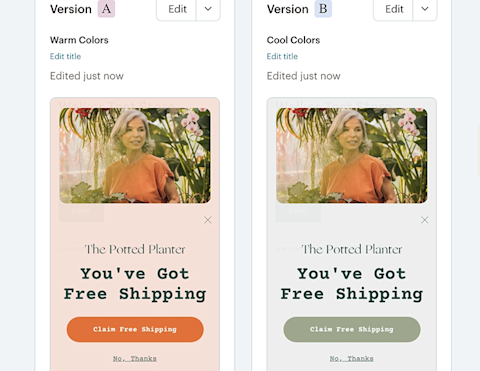
At a glance
-
What it does
✓ Measures opens, clicks, and revenue
✓ Identifies winning campaign elements
✓ Compares two email versions automatically -
Who it's for
✓ Marketers optimizing email performance
✓ E-commerce businesses increasing sales
✓ Teams making data-driven decisions -
Key outcomes
✓ Higher email open and click rates
✓ Improved conversion rates and revenue
✓ Better understanding of your audience

CASE STUDY
Lovepop doubles engagement and revenue with A/B testing
At Lovepop, Mailchimp helped the custom pop-up greeting card company improve its email performance by using A/B and multivariate testing to refine subject lines, send times, and content. By continually learning what resonates with customers, the team doubled both engagement (opens and clicks) and revenue, turning testing into a core part of their email strategy.

CASE STUDY
RetroSupply Co. builds business strategy with testing insights
At RetroSupply Co., Mailchimp helped uncover what motivates customers by testing content formats and email elements. Rather than making assumptions, the brand used insights from A/B tests to influence not only its email strategy but all of its marketing, leading to real improvements in revenue and list growth through better audience understanding.
Try our Standard plan for free!
Find out why customers see up to 24x ROI* using the Standard plan with a risk-free 14-day trial†. Cancel or downgrade to our Essentials or basic Free plans at any time.
Find out why customers see up to 24x ROI* using the Standard plan with a risk-free 14-day trial†. Cancel or downgrade to our Essentials or basic Free plans at any time.
Find out why customers see up to 27x ROI* using the Standard plan with a 14-day trial†. Cancel or downgrade to our Essentials or basic Free plans at any time.
Find out why customers see up to 27x ROI* using the Standard plan with a 14-day trial†. Cancel or downgrade to our Essentials or basic Free plans at any time.
Get 15% off our Standard plan
Businesses with 10,000+ contacts can save 15% on their first 12 months.† Keep your discount if you change to Premium or Essentials. Cancel or downgrade to our basic Free plan at any time.
Businesses with 10,000+ contacts can save 15% on their first 12 months.† Keep your discount if you change to Premium or Essentials. Cancel or downgrade to our basic Free plan at any time.
Businesses with 10,000+ contacts can save 15% on their first 12 months.† Keep your discount if you change to Premium or Essentials. Cancel or downgrade to our basic Free plan at any time.
Businesses with 10,000+ contacts can save 15% on their first 12 months.† Keep your discount if you change to Premium or Essentials. Cancel or downgrade to our basic Free plan at any time.
-
Generative AI features
-
Actionable insights into audience growth and conversion funnels
-
Enhanced automations
-
Custom-coded email templates
-
Customizable Popup forms
-
Personalized onboarding
Standard
Send up to 6,000 emails each month.Send up to 100 emails risk-free—no credit card required. Save a payment method to unlock 5,900 sends for the rest of your free trial.
Free for 14 days
Then, starts at 0 per month†
per month for 12 months
Then, starts at per month†
†See Free Trial Terms. Overages apply if contact or email send limit is exceeded. Learn More
†See Free Trial Terms. Overages apply if contact or email send limit is exceeded. Learn More
†See Free Trial Terms. Overages apply if contact or email send limit is exceeded. Learn More
Save 15% on the ultimate expert-assisted platform for growth
Engage your audience and increase sales with 15% off your first 12 months†. Plus, get expert support to help migrate your data and provide strategic guidance—exclusive to the Premium plan.
- Phone & Priority Support
- Popup Forms
- Multivariate and A/B Testing
- Enhanced marketing automation flows
- Dedicated Personalized Onboarding
- Predictive Segmentation
Larger contact list? Call +1 (800) 330-4838 for custom pricing, annual plans, demos, and more. Contact sales.
Premium
Send up to 150,000 emails each month.
Save 15% on 10,000+ contacts
per month for 12 months
Then, starts at per month†
†See Offer Terms. Overages apply if contact or email send limit is exceeded. Learn More
Larger contact list? Call +1 (800) 330-4838 for custom pricing, annual plans, demos, and more. Contact sales.
How long you should run an A/B test?
-
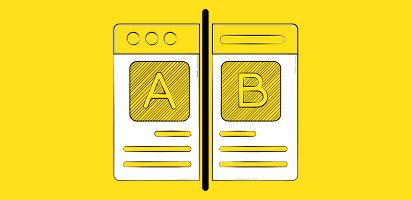
How long you should run an A/B test?
Comprehensive guide to running effective A/B tests including sample size calculations, test duration recommendations, and how to analyze results for maximum impact.
-

A/B/n testing: the secret to boosting user engagement
Learn how to test three or more variations simultaneously with A/B/n testing. Discover when to use this approach and how it differs from standard A/B testing.
-
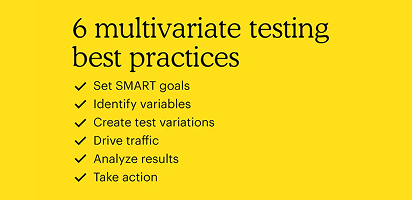
What is multivariate testing and how it compares to A/B testing
Test multiple variables simultaneously to understand how different elements interact. Multivariate testing is perfect for optimizing complex emails with large subscriber lists.
FAQs
-
Data-driven decision making Every A/B test is a scientific experience that begins with a test hypothesis about which elements should outperform others. By systematically testing different elements - from web page layouts to email subject lines - you can discover exactly what resonates with your target audience and drives better test results.
Improved conversion rates A/B testing directly impacts your bottom line by showing you exactly what drives conversions. Even small changes, when validated through tested, can lead to significant improvements in conversion rates. Each successful test builds upon previous wins, creating a compounding effect that can dramatically improve your marketing performance.
Enhanced user experience A/B testing helps you understand which content versions perform better across different devices and platforms. Tracking behavior patterns and engagement metrics allows you to identify pain points. This insight allows you to create smoother, more intuitive experiences that keep users engaged and moving toward conversion.
Reduced risk and cost Running A/B tests before fully implementing changes helps you avoid costly mistakes. Instead of rolling out major changes to your entire audience, you can collect data from a smaller sample to validate your ideas. This approach can help you save money while protecting your brand by ensuring new designs actually improve performance. When you do invest in changes, you can do so with confidence, knowing they've been proven effective through testing.
-
A/B testing (split testing) is a method of comparing two versions of an email to determine which performs better with your audience. You change one element (subject line, content, From name, or send time), send both versions to different subscriber segments, and measure which drives better results based on opens, clicks, or revenue. The winning version can then be sent to your remaining subscribers.
-
Mailchimp requires a minimum of 10% of your list for testing, but we recommend at least 5,000 subscribers per variation (10,000 total) for reliable results. Larger sample sizes increase confidence that results aren't due to chance. If your list is smaller, you can still test but should run tests longer and focus on clear, significant differences rather than small improvements.
-
Mailchimp's A/B testing allows you to test four variables: subject lines (including personalization, length, emojis), From names (personal vs. company names), email content (layouts, images, copy, CTAs), and send times (day of week and time of day). You test one variable per campaign to ensure you know exactly what caused performance differences.
-
Test duration depends on what you're measuring. For open rates, wait 2-12 hours (2 hours gives 80% accuracy, 12+ hours gives 90%+ accuracy). For click rates, wait 1-3 hours. For revenue tests, wait 12-24 hours since purchases happen after opens and clicks. These timeframes assume lists of 5,000+ subscribers per variation. Smaller lists need longer test periods for statistical significance.
-
Run only one test at a time Running multiple tests simultaneously might seem efficient, but it can muddy your results. When you test one email subject line while also testing button colors in the same campaign, you won't know which change caused the improvement. Keep it simple and test one element at a time, measure its impact, then move on to your next test.
Ensure a large enough sample size Small test groups produce unreliable results. Aim for at least 5,000 subscribers per variation (10,000 total minimum for a two-variant test). Larger samples increase confidence that results aren't due to chance. If your list is smaller, extend test duration to gather more interaction data before declaring a winner.
Avoid testing during unusual periods Holiday seasons, major sales events, or unusual news events can skew your results. For example, testing email subject lines during Black Friday week won't give you reliable data about what works during regular business periods. Wait for typical business conditions to run your tests. This ensures your results will be useful year-round. If you do need to test during special periods, compare those results only to similar timeframes.
Let tests run their full duration Let your test run long enough to gather solid data. Ending it too soon can give you unreliable results. Most A/B/n tests need at least 1-2 weeks, but it really depends on your traffic and conversion rates. Wait until you reach statistical significance—usually a 95% confidence level—before choosing a winning variant.
Document and share learnings Create a testing log documenting what you tested, your hypothesis, results, and insights. Share findings with your team. These learnings compound over time, helping you understand your audience deeply. Even "failed" tests (where neither version performs significantly better) provide valuable information about what doesn't move the needle.
-
Yes, A/B testing works with Mailchimp's automated email workflows, including welcome series, abandoned cart emails, and post-purchase sequences. Testing automated emails helps optimize customer journeys over time. However, you need sufficient traffic through the automation to achieve meaningful results, so focus on your highest-volume automated campaigns first.
-
Statistical significance indicates confidence that your test results reflect real differences, not random chance. A 95% confidence level (industry standard) means there's only a 5% probability the results occurred by chance. Mailchimp calculates this automatically. Reach statistical significance by testing with adequate sample sizes and appropriate test durations for your chosen metric.
-
If test results are too close to call (no statistical significance), Mailchimp sends the first variation to remaining subscribers by default. This result is still valuable—it tells you the change you tested doesn't significantly impact your audience's behavior. Use this insight to test different, more substantial changes instead. Document "no difference" results to avoid retesting the same ideas.
-
Yes. When setting up your A/B test, choose "Manual selection" as your winning criteria. This lets you review all metrics (opens, clicks, revenue, unsubscribes, spam complaints) before deciding which version to send to remaining subscribers. Manual selection is useful when you want to consider secondary metrics beyond just the primary success measure or when you have business reasons to prefer one version over another despite similar performance.
-
Yes. Mailchimp's A/B testing allows up to 3 variations of a single variable (called A/B/n testing). For testing multiple elements simultaneously, use multivariate testing (available on Standard plans and higher). However, testing more variations requires larger audience sizes to achieve statistical significance.
-
A/B testing is available on Essentials plans and higher. Free plans do not include A/B testing. Multivariate testing (testing multiple variables simultaneously) requires a Standard plan or higher. Check Mailchimp's current pricing page for specific feature availability by plan tier.
-
When to use each method:
Choose A/B testing when:
- You're new to email testing
- Your list has fewer than 25,000 subscribers
- You want to test major changes (completely different designs, offers, or messages)
- You need quick, clear answers about what works better
Choose multivariate testing when:
- You have experience with A/B testing
- Your list has 25,000+ subscribers
- You want to optimize multiple elements and see how they interact
- You're fine-tuning an already successful email template
Grow your audience and your revenue
Millions trust the world's #1 email marketing and automations platform. You can too.
*Disclaimers
- 24X ROI Standard Plan: Based on all e-commerce revenue attributable to Standard plan users’ Mailchimp campaigns from April 2023 to April 2024. ROI calculation requires an e-commerce store that is connected to a Mailchimp account.
- #1 email marketing and automation platform: Based on May 2025 publicly available data on competitors' number of customers.
- Availability of features and functionality varies by plan type. For details, please view Mailchimp's various plans and pricing.