EMAIL MARKETING SEGMENTATION
Segment your email list to drive conversions
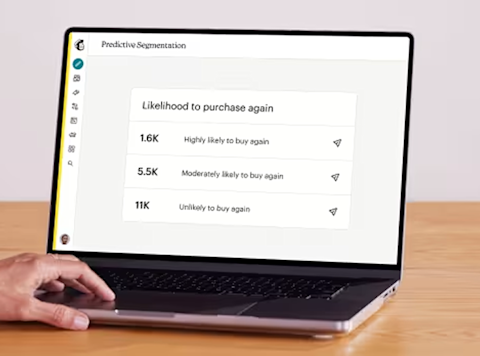
Segment subscribers by demographics, behavior, or interests. Marketers see 2x more revenue from connected stores using predicted segments.*
What is email list segmentation?
Email list segmentation is the practice of dividing your email subscribers into distinct groups using tags and segments in your email marketing platform. Each subscriber can belong to multiple segments based on factors like age, location, purchase history, or engagement level.
Segmentation differs from personalization. Personalization customizes individual email content with elements like a subscriber's name or recent purchases. Segmentation groups similar audience members together to send them more relevant campaigns as a group.
The goal is creating content that's relevant to your audience based on criteria you define. For example, a pet products company might create two segments: cat owners and dog owners. Each segment receives different content tailored to their specific needs.
Email segmentation by type
-
Interest-based segments
Segments based on subscriber interests consistently deliver strong engagement because content aligns with self-reported preferences.*
-
Behavioral segments
Segments based on past actions and engagement help you identify your most valuable customers and re-engage inactive subscribers.*
-
Demographic segments
Segmenting by customer characteristics like job title, age, or location produces solid results and is typically the easiest segmentation to implement.*
Why does email list segmentation increase conversions?
Segmented email campaigns consistently outperform non-segmented campaigns across every metric. When you send relevant content to specific groups, subscribers engage more and convert at higher rates.
Try our Standard plan for free!
Find out why customers see up to 24x ROI* using the Standard plan with a risk-free 14-day trial†. Cancel or downgrade to our Essentials or basic Free plans at any time.
Find out why customers see up to 24x ROI* using the Standard plan with a risk-free 14-day trial†. Cancel or downgrade to our Essentials or basic Free plans at any time.
Find out why customers see up to 27x ROI* using the Standard plan with a 14-day trial†. Cancel or downgrade to our Essentials or basic Free plans at any time.
Find out why customers see up to 27x ROI* using the Standard plan with a 14-day trial†. Cancel or downgrade to our Essentials or basic Free plans at any time.
Get 15% off our Standard plan
Businesses with 10,000+ contacts can save 15% on their first 12 months.† Keep your discount if you change to Premium or Essentials. Cancel or downgrade to our basic Free plan at any time.
Businesses with 10,000+ contacts can save 15% on their first 12 months.† Keep your discount if you change to Premium or Essentials. Cancel or downgrade to our basic Free plan at any time.
Businesses with 10,000+ contacts can save 15% on their first 12 months.† Keep your discount if you change to Premium or Essentials. Cancel or downgrade to our basic Free plan at any time.
Businesses with 10,000+ contacts can save 15% on their first 12 months.† Keep your discount if you change to Premium or Essentials. Cancel or downgrade to our basic Free plan at any time.
-
Generative AI features
-
Actionable insights into audience growth and conversion funnels
-
Enhanced automations
-
Custom-coded email templates
-
Customizable Popup forms
-
Personalized onboarding
Standard
Send up to 6,000 emails each month.Send up to 100 emails risk-free—no credit card required. Save a payment method to unlock 5,900 sends for the rest of your free trial.
Free for 14 days
Then, starts at 0 per month†
per month for 12 months
Then, starts at per month†
†See Free Trial Terms. Overages apply if contact or email send limit is exceeded. Learn More
†See Free Trial Terms. Overages apply if contact or email send limit is exceeded. Learn More
†See Free Trial Terms. Overages apply if contact or email send limit is exceeded. Learn More
Save 15% on the ultimate expert-assisted platform for growth
Engage your audience and increase sales with 15% off your first 12 months†. Plus, get expert support to help migrate your data and provide strategic guidance—exclusive to the Premium plan.
- Phone & Priority Support
- Popup Forms
- Multivariate and A/B Testing
- Enhanced marketing automation flows
- Dedicated Personalized Onboarding
- Predictive Segmentation
Larger contact list? Call +1 (800) 330-4838 for custom pricing, annual plans, demos, and more. Contact sales.
Premium
Send up to 150,000 emails each month.
Save 15% on 10,000+ contacts
per month for 12 months
Then, starts at per month†
†See Offer Terms. Overages apply if contact or email send limit is exceeded. Learn More
Larger contact list? Call +1 (800) 330-4838 for custom pricing, annual plans, demos, and more. Contact sales.
FAQs
-
Step 1: Determine your criteria Decide how you'll group your audience based on available customer data. Collect information through signup forms, website analytics, purchase records, and email engagement metrics. Choose criteria that align with your business goals and campaign objectives. E-commerce businesses might prioritize purchase history while B2B companies focus on industry and company size.
Step 2: Collect and organize data Ensure your website and email platform can capture the data you need. Use your CRM to track customer interactions, behaviors, and preferences. Set up automated workflows that add subscribers to segments based on specific triggers like purchases, page visits, or email clicks. This eliminates manual list management and ensures segments stay current.
Step 3: Build your segments Use your email marketing platform's segmentation tools to create groups based on your chosen criteria. Mailchimp allows you to create simple segments if you're a beginner, or you can create more complex segments with more specific parameters. More complex audience segments can allow you to further target your audience in unique and engaging ways with content they're actually interested in.
Step 4: Create targeted content Design emails specifically for each segment. Keep your segment's characteristics in mind when writing subject lines, body copy, and calls-to-action. Use language, imagery, and offers that resonate with each group's needs and preferences. Younger audiences may respond to different messaging than older demographics.
Step 5: Test and optimize Measure performance metrics including open rates, click rates, conversion rates, and unsubscribe rates for each segment. Use A/B testing to refine your messaging and improve results. Continuously evaluate whether your segmentation criteria effectively identify engaged, high-converting subscribers. Adjust segments as customer behaviors and preferences evolve.
-
Begin with demographic data (location, age) and engagement level (active vs. inactive) because this data is easy to collect and immediately actionable. As you build your strategy, add behavioral segments based on purchase history and website activity, then interest-based segments from preference center data.
-
To create an audience segment in Mailchimp, navigate to the "Audience" section, then click on "Segments." From here, you can click the "Create segment" button to build different audience groupings. Mailchimp allows you to create simple segments if you're a beginner, or you can create more complex segments with more specific parameters. More complex audience segments can allow you to further target your audience in unique and engaging ways with content they're actually interested in.
-
Start simple, then refine Begin with one or two basic segmentation criteria like location or engagement level. As you collect more data and understand what works, add more sophisticated segments. Starting simple prevents overwhelm and helps you learn which criteria matter most for your audience.
Keep segments broad enough to be useful Avoid creating segments so narrow they contain too few subscribers to provide meaningful data. Each segment should be large enough to draw insights from performance metrics. Balance specificity with practical size to ensure your segmentation efforts are worth the time invested.
Regularly clean your list Remove inactive subscribers, hard bounces, and invalid email addresses to maintain list health. Regular cleaning improves deliverability rates and provides more accurate performance data. Set a schedule to review and clean your list quarterly or monthly depending on list size.
Test different segment combinations Experiment with combining multiple segmentation criteria to create highly targeted micro-segments. For example, combine demographic and behavioral data to target young professionals who frequently engage with specific product categories. Test these combinations to find what drives the best results.
Use dynamic content Leverage dynamic content blocks that automatically change based on segment membership. This allows you to send one campaign with content that adapts to each recipient's segment, saving time while maintaining personalization. Dynamic content works especially well for product recommendations and location-based offers.
Monitor and adjust segments over time Customer behaviors and preferences change. Review segment performance regularly and adjust criteria as needed. Move subscribers between segments based on their actions and engagement. Segments should evolve with your audience to remain effective.
-
Mailchimp offers a lot of segmenting options that will help you make the most out of your audience. With the right kind of data, you can create focused segments of your contacts for emails, text messages, ads, and surveys. Check out All the Segmenting Options to learn more about creating segments and groups in Mailchimp.
-
Collect segmentation data through signup forms with optional fields for preferences and interests, website analytics that track browsing behavior, purchase history from your e-commerce platform, email engagement metrics like opens and clicks, and customer surveys that ask about preferences and needs.
-
Segmentation groups similar subscribers together to send them relevant campaigns as a group. Personalization customizes individual email content with specific details like names or purchase history. Use both together for maximum impact: segment your list, then personalize content within each segment.
-
Yes. Subscribers often belong to multiple segments simultaneously based on different criteria. Someone might be in both a geographic segment (New York residents) and a behavioral segment (frequent purchasers). Your email platform should handle overlapping segments and prevent duplicate sends.
-
Use automated workflows that update segments in real-time based on subscriber actions. Review segment criteria and performance monthly or quarterly to ensure they still align with business goals. Clean your list regularly by removing inactive subscribers and invalid addresses.
Grow your audience and your revenue
Millions trust the world's #1 email marketing and automations platform. You can too.
*Disclaimers
- Predictive Segments Double Revenue: 266% (or 2x) more revenue on average for Standard and Premium plan marketers for their connected ecommerce stores using predictive segmented emails versus non-predictive segmented emails for Jan 2023 - Dec 2024 period. Integration data is order data from a user’s connected e-commerce store. Predictive segements available on Standard or Premium plans only.
- 24X ROI Standard Plan: Based on all e-commerce revenue attributable to Standard plan users’ Mailchimp campaigns from April 2023 to April 2024. ROI calculation requires an e-commerce store that is connected to a Mailchimp account.
- #1 email marketing and automation platform: Based on May 2025 publicly available data on competitors' number of customers.
- Availability of features and functionality varies by plan type. For details, please view Mailchimp's various plans and pricing.