


Social Media
Build your following on social media
Mailchimp's social media post schedulers makes creating and publishing your social media campaigns easy.
Save time with scheduled social media posts
To reach the right people on social media, you need the right tools. With Mailchimp, you’ve got everything you need to schedule social media posts and ease the burden of managing your social media strategy.

The more you post on social media, the easier it is for people to get to know you. Mailchimp's social media scheduling tool gives you what you need to make social media management easy.
See how Mailchimp's all-in-one Marketing Platform helps you market smarter.
It’s true that social media is a great way to promote your products and grow your audience, but it tends to be a crowded landscape. Luckily, we’ve got tips to help you make your posts stand out and get the attention they deserve.

See how our social media and digital ad creation tools stack up against the competition.
A social media scheduler is a tool that lets you create posts in advance and publish them automatically. No need to log in to each platform manually at the time you want to post. You set a date and time, and the tool handles the rest.
Good schedulers support multiple platforms from one dashboard, so you can manage everything in one place. They save time by letting you batch your content creation instead of posting on the fly, which keeps your presence consistent even when you're busy running your business.
Rather than scrambling to post in the moment, you can sit down once a week, plan your content, and know it will go out on schedule.
Beyond timing, the best schedulers also include analytics, a content calendar, and AI-powered tools to help you plan smarter and improve your content over time.
Yes, social media scheduling is built directly into Mailchimp. You can schedule posts to Facebook Pages, Instagram business profiles, and X (Twitter) without leaving the platform. Scheduling requires a Standard plan or higher. Immediate publishing is available on all plans, including Free.
Mailchimp supports scheduling to Facebook Pages, Instagram business profiles, and X (Twitter). You can post to one platform at a time or publish the same content across multiple networks simultaneously, making it easy to maintain a consistent presence wherever your audience is.
You can schedule posts a minimum of 2 hours ahead and up to 3 months in advance. This gives you plenty of runway to plan campaigns around product launches, seasonal promotions, or any other key dates on your marketing calendar. Before the publish date, you can pause, edit, or reschedule a post at any time.
Mailchimp isn't a standalone social media tool. It's part of a full marketing platform. Your social posts connect to your email campaigns, ads, automations, and audience data, so everything works together from a single dashboard.
That integration matters. When you can see how your social content performs alongside your emails and ads, it's easier to understand what's driving results and where to focus your effort. Instead of managing separate tools for each channel and manually piecing together reports, you can plan, execute, and measure all your marketing in one place.
Mailchimp's Free plan supports immediate publishing to social media, but scheduling posts in advance requires a Standard plan or above. If you're just getting started, the Free plan is a good way to try out Mailchimp's social tools before committing to a paid plan. See mailchimp.com/pricing for a full plan comparison.
Scheduling a post in Mailchimp takes just a few steps:
Once your post is scheduled, you can find it under the Campaigns tab if you need to make any changes before it goes live.
Social Media
Mailchimp's social media post schedulers makes creating and publishing your social media campaigns easy.
Brand
Our deceptively simple design tools will help bring your ideas to life in professional-looking marketing campaigns that look and feel like you.
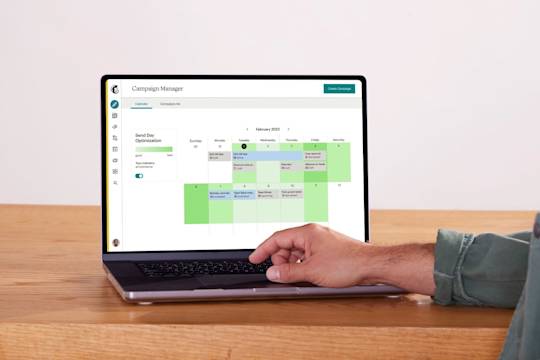
Campaign Manager
Create, manage, and analyze multi-channel campaigns all in one place with Mailchimp's Campaign Manager. Utilize webhooks for a seamless integration with third-party apps. Try it now!