EMAIL AUTOMATION
Automate email marketing to reach customers on time
Send personalized emails triggered by actions like signups or purchases. Marketers see up to 9x more revenue with marketing automation flows.*
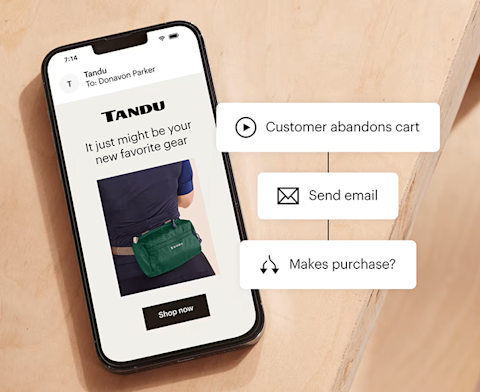
At a glance
-
What it does
✓ Sends emails based on customer actions
✓ Nurtures leads through personalized journeys
✓ Works 24/7 without manual intervention -
Who it’s for
✓ Stores recovering abandoned carts
✓ Businesses welcoming new subscribers
✓ Marketers re-engaging inactive customers -
Key outcomes
✓ Higher engagement and conversion rates
✓ Time saved on repetitive marketing tasks
✓ More revenue from existing customers
CASE STUDY
How Blink built its Business with Email Automation
At Blink, Mailchimp helped build the business from the ground up by using email automation to connect with customers at the right moments. By setting up automated journeys that welcomed new subscribers, nurtured interest, and encouraged repeat purchases, Blink created a scalable email strategy that drove consistent engagement and revenue as the brand grew.
CASE STUDY
How Kaylin + Kaylin Pickles increased its engagement
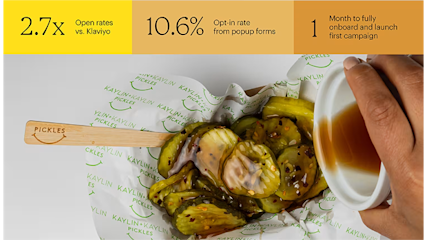
At Kaylin & Kaylin Pickles, Mailchimp helped improve email performance after the brand switched platforms in search of better engagement. By simplifying campaign creation and improving deliverability, the team was able to reach more customers with relevant messages, leading to stronger engagement and better results from every send.
Try our Standard plan for free!
Find out why customers see up to 24x ROI* using the Standard plan with a risk-free 14-day trial†. Cancel or downgrade to our Essentials or basic Free plans at any time.
Find out why customers see up to 24x ROI* using the Standard plan with a risk-free 14-day trial†. Cancel or downgrade to our Essentials or basic Free plans at any time.
Find out why customers see up to 27x ROI* using the Standard plan with a 14-day trial†. Cancel or downgrade to our Essentials or basic Free plans at any time.
Find out why customers see up to 27x ROI* using the Standard plan with a 14-day trial†. Cancel or downgrade to our Essentials or basic Free plans at any time.
Get 15% off our Standard plan
Businesses with 10,000+ contacts can save 15% on their first 12 months.† Keep your discount if you change to Premium or Essentials. Cancel or downgrade to our basic Free plan at any time.
Businesses with 10,000+ contacts can save 15% on their first 12 months.† Keep your discount if you change to Premium or Essentials. Cancel or downgrade to our basic Free plan at any time.
Businesses with 10,000+ contacts can save 15% on their first 12 months.† Keep your discount if you change to Premium or Essentials. Cancel or downgrade to our basic Free plan at any time.
Businesses with 10,000+ contacts can save 15% on their first 12 months.† Keep your discount if you change to Premium or Essentials. Cancel or downgrade to our basic Free plan at any time.
-
Generative AI features
-
Actionable insights into audience growth and conversion funnels
-
Enhanced automations
-
Custom-coded email templates
-
Customizable Popup forms
-
Personalized onboarding
Standard
Send up to 6,000 emails each month.Send up to 100 emails risk-free—no credit card required. Save a payment method to unlock 5,900 sends for the rest of your free trial.
Free for 14 days
Then, starts at $20 per month†
per month for 12 months
Then, starts at per month†
†See Free Trial Terms. Overages apply if contact or email send limit is exceeded. Learn More
†See Free Trial Terms. Overages apply if contact or email send limit is exceeded. Learn More
†See Free Trial Terms. Overages apply if contact or email send limit is exceeded. Learn More
Save 15% on the ultimate expert-assisted platform for growth
Engage your audience and increase sales with 15% off your first 12 months†. Plus, get expert support to help migrate your data and provide strategic guidance—exclusive to the Premium plan.
- Phone & Priority Support
- Custom-Coded and Pre-built Email Templates
- Multivariate and A/B Testing
- Enhanced marketing automation flows
- Dedicated Personalized Onboarding
- Predictive Segmentation
Larger contact list? Call +1 (800) 330-4838 for custom pricing, annual plans, demos, and more. Contact sales.
Premium
Send up to 150,000 emails each month.
Save 15% on 10,000+ contacts
per month for 12 months
Then, starts at per month†
†See Offer Terms. Overages apply if contact or email send limit is exceeded. Learn More
Larger contact list? Call +1 (800) 330-4838 for custom pricing, annual plans, demos, and more. Contact sales.
More resources for email automation success
-
Common mistakes in multi-channel automation
Avoid common mistakes in multi-channel marketing automation and learn how to improve customer engagement.
-
How to automate SaaS marketing for reach and results
Learn how to automate SaaS marketing with smart tools and targeted workflows to increase sales and growth.
-
Email autoresponder 101: automate your sales machine
Learn how to craft an email autoresponder that nurtures leads, drives sales, and turns subscribers into loyal customers.
FAQs
-
Personalize customer experiences at scale Research shows 90% of consumers find personalized content appealing. Automation lets you send personalized messages to thousands of customers simultaneously, tailoring content based on their behavior, preferences, and purchase history.
Improved conversion rates A/B testing directly impacts your bottom line by showing you exactly what drives conversions. Even small changes, when validated through tested, can lead to significant improvements in conversion rates. Each successful test builds upon previous wins, creating a compounding effect that can dramatically improve your marketing performance.
Enhanced user experience A/B testing helps you understand which content versions perform better across different devices and platforms. Tracking behavior patterns and engagement metrics allows you to identify pain points. This insight allows you to create smoother, more intuitive experiences that keep users engaged and moving toward conversion.
Reduced risk and cost Running A/B tests before fully implementing changes helps you avoid costly mistakes. Instead of rolling out major changes to your entire audience, you can collect data from a smaller sample to validate your ideas. This approach can help you save money while protecting your brand by ensuring new designs actually improve performance. When you do invest in changes, you can do so with confidence, knowing they've been proven effective through testing.
-
Email marketing automation uses software to send targeted, personalized emails based on predefined triggers and workflows. Instead of manually sending each email, you set up rules that automatically send messages when customers take specific actions (like signing up, making a purchase, or abandoning a cart) or at specific times (like birthdays or subscription renewals). This creates timely, relevant communication without constant manual work.
-
No. Mailchimp's visual automation builder uses a drag-and-drop interface that requires no coding or technical expertise. Pre-built templates handle the logic and timing for common scenarios like welcome series and abandoned carts. If you can create a regular email campaign, you can build an automation. More advanced features like conditional splits are available when you're ready, but they're optional.
-
A simple automation using a pre-built template can be created in 15-30 minutes: choose your template, customize the email content, adjust timing, and activate. More complex custom workflows with multiple emails, conditions, and segments might take 1-2 hours to properly set up and test. The time investment pays off—once active, automations work indefinitely without additional effort.
-
Regular campaigns are one-time broadcasts sent manually to your entire list or a segment at a specific time. Automations are ongoing workflows triggered by individual subscriber actions or dates, sending personalized messages to each person at the optimal moment in their customer journey. Campaigns require you to remember to send them; automations work continuously in the background once set up.
-
Keep automation emails human Automated doesn't mean robotic. Write in a conversational, authentic voice that reflects your brand personality. Use first names, reference specific actions customers took, and provide genuine value in every message. Avoid overly sales-focused language that screams "automated marketing email."
Test before launching Always send test emails to yourself and colleagues before activating an automation. Check that personalization tags display correctly, links work, images load, and formatting looks good across devices. Trigger the automation yourself to experience the full sequence as customers will.
Segment for relevance Not everyone should receive the same automated messages. Segment by purchase history, engagement level, location, interests, or customer lifetime value to send more targeted, relevant content. Segmented campaigns get significantly higher open and click rates than non-segmented blasts.
Monitor and optimize regularly Set a quarterly review schedule for all active automations. Check which emails have low engagement and need refreshed content. Look for opportunities to add new touches or improve timing. Customer behavior and preferences change—your automations should evolve too.
Provide clear unsubscribe options Always include easy unsubscribe links in automated emails. Consider offering granular preferences so subscribers can opt out of certain automation types while staying on your main list. Respecting subscriber preferences builds trust and improves overall engagement.
Don't over-automate Balance is key. While automation handles repetitive tasks beautifully, maintain opportunities for personal outreach and human connection. Some situations—like customer service issues or high-value sales—deserve direct, personalized attention that no automation can replicate.
-
Common triggers include: subscriber joins your list, makes a purchase, abandons their shopping cart, clicks a specific link in an email, visits certain website pages, reaches a birthday or anniversary, hasn't opened emails in X days, joins or leaves an audience group, or gets tagged with specific criteria. Mailchimp also supports API triggers for custom scenarios and negative triggers based on inaction.
-
Check your automation reports in Mailchimp for key metrics: open rates (are people reading?), click rates (are they engaged?), conversion rates (are they taking action?), and revenue generated (for e-commerce). Compare these to your regular campaign averages—automated emails typically perform better. Also monitor unsubscribe rates and spam complaints to ensure messages are well-received.
-
It depends on your goal. Welcome series typically include 3-5 emails over the first week or two. Abandoned cart sequences often send 2-3 reminders over 3-7 days. Post-purchase series might include 5-10+ emails spread over weeks or months. The key is providing value without overwhelming subscribers. Monitor unsubscribe rates—if they spike, you're likely sending too many or too frequently.
-
Yes, subscribers can be in multiple automations simultaneously unless you set exclusions. For example, someone might receive your welcome series while also getting abandoned cart reminders. Use Mailchimp's queue settings to control how many automated emails someone can receive in a day, preventing email fatigue. You can also set rules to remove subscribers from one automation when they enter another.
-
Classic automations are simpler, linear email sequences based on a single trigger. Customer Journey Builder (available on Standard plans and higher) offers advanced features like conditional splits, branching logic, multiple triggers, action-based progressions, and multi-channel campaigns (email + SMS). Start with classic automations to learn the basics, then graduate to Journey Builder for complex, personalized customer experiences.
Grow your audience and your revenue
Millions trust the world's #1 email marketing and automations platform. You can too.
*Disclaimers
- 9x more revenue: Based on total revenue generated from bulk emails by users’ of Marketing Automation Flows from January 2023 - January 2025. Marketing Automation Flows functionality varies by plan type.
- 24X ROI Standard Plan: Based on all e-commerce revenue attributable to Standard plan users’ Mailchimp campaigns from April 2023 to April 2024. ROI calculation requires an e-commerce store that is connected to a Mailchimp account.
- #1 email marketing and automation platform: Based on May 2025 publicly available data on competitors' number of customers.
- Availability of features and functionality varies by plan type. For details, please view Mailchimp's various plans and pricing.