Tags & Custom fields
Unlock better targeting when you organize your contacts in Mailchimp
With all your contact insights organized in Mailchimp, it’s easy to send messages that matter.


Contact Profiles
Contact profiles give you an in-depth view of each person in your audience—simple, powerful, and accessible from any device.
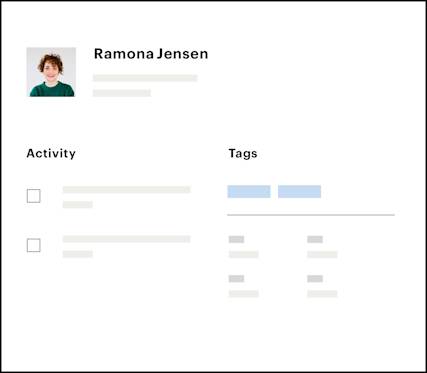

When you connect your store, Mailchimp’s e-commerce features track purchases tied to your campaigns. In each contact’s profile, you'll see their purchase information and which of your campaigns led them to buy something, so you can figure out what works for your people.

Not only can you have more relevant conversations with a contact’s profile at your fingertips, you can also leave notes or add a tag based on what you talk about. That way, you have the information you need to follow up with the right message later, or you can even set up automations based on tags you apply.

Rather than simply looking at a campaign’s performance in a report, you can check out individual contact profiles to meet the people behind the clicks. There you’ll learn things like whether or not they’ve read something on mobile, when they joined your list, and more.
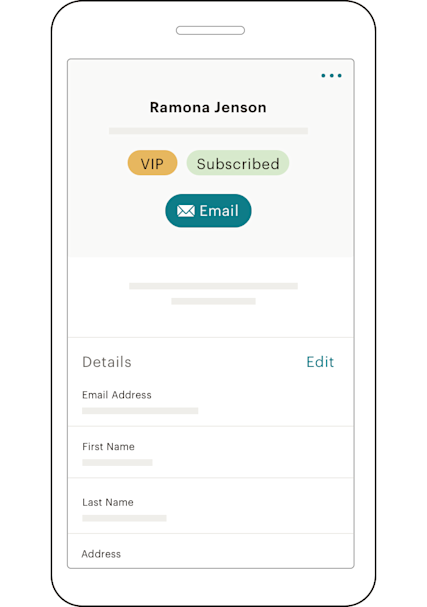
Track your contacts’ recent activity to see how they’re engaging with your campaigns. You can also quickly create tags, add personal notes, or reach out to contacts directly via email, text, or call.
A contact profile is an individual record for each person in your Mailchimp audience. It holds everything Mailchimp knows about that contact, including their purchase history, campaign engagement, any tags you've assigned, notes you've added, and behavioral data collected over time.
Every person who enters your audience gets their own profile, and it grows richer with each interaction. Mailchimp contact profiles give you a complete, individual-level view of every person you're marketing to.
A marketing contact is any individual in your audience who is eligible to receive your campaigns, meaning they have an active subscription status and can be reached through your emails, ads, or other outreach.
In Mailchimp, every marketing contact gets a profile that fills in automatically. Each interaction, whether it’s an email open, a product purchase, or a link click, adds another layer of information to that record. Over time, those profiles become one of the most useful tools in your marketing stack.
Mailchimp makes contact management simple. Contact profiles pull together a wide range of data in one place. Here's what you'll find inside a typical profile:
Purchase history: A record of what a contact has bought, which helps you identify buying patterns and spot your most valuable customers. Campaign engagement: Data on opens, clicks, and the devices contacts use, so you can see exactly how they interact with your emails. Subscription date: When they joined your list. This information is useful for onboarding sequences and loyalty campaigns. Tags and notes: Labels and manual notes your team has added to track things that matter to your business. Predicted demographics: Mailchimp's tools can estimate age range and gender based on engagement patterns. Marketing status: Whether a contact is subscribed, unsubscribed, or non-subscribed, and whether they've been cleaned from your list.
All of that data lives in one place, so you can send the message that's most likely to land without digging through multiple tools to piece together context.
Organize contacts in Mailchimp using tags, custom fields, and segments — each one built from the data that lives inside your contact profiles.
Tags let you label contacts based on behavior, interests, or purchase history. Custom fields let you store additional information specific to your business. From there, you can build segments that group contacts sharing common traits, then use those segments to trigger automations or target specific audiences.
Your Mailchimp contacts are a segmentable, actionable audience that gets more useful as your data grows, allowing you to optimize your marketing over time.
The data inside your contact profiles connects directly to how well your campaigns perform. Here are a few ways to put it to work:
Purchase history: Use it to identify what's actually driving conversions, then build campaigns around those products or behaviors. Engagement tracking: See which contacts are opening and clicking, and use that information to refine your targeting or re-engage the ones who've gone quiet. Behavior-triggered automations: Set up automations that fire when a contact gets a specific tag or takes a certain action, so your follow-up feels timely and relevant.
The more you know about your marketing contacts, the more relevant and effective your campaigns become.
Yes. Mailchimp's mobile app gives you access to your contact profiles wherever you are. You can view a contact's profile and recent activity, add or update tags, write notes, and reach out directly via email or text from your phone.
Whether you're at an event, between meetings, or away from your desk, your Mailchimp contacts are accessible and actionable from anywhere. That goes for email list management and efforts to build your email list, too! You're not tied to a desktop to keep things moving.
Tags & Custom fields
With all your contact insights organized in Mailchimp, it’s easy to send messages that matter.
Audience Management
See how Mailchimp’s audience management tools can help you create audience and customer segments for better marketing campaigns.
Best customers automation
Reward your loyal fans with special sales, offers, and promotions.
*Disclaimers