How to bring a human touch to your marketing automation
Automation is an incredible time-saver; it helps create effective customer experiences while supporting the evolving opportunities that come with growth. But as your business scales, human oversight is still needed to develop smarter segments and more nuanced workflows.
The challenge, then, is to avoid overlaps and over-communication with customers. Mailchimp’s 2026 report, The Art of the Opt-in, found that 68% of consumers unsubscribed because of receiving too many emails.
Even the most powerful automation benefits from close human guidance. But you don’t have time to pick your way through an ever-expanding collection of segments and automation flows. Your focus needs to be on refining and optimizing marketing performance and on drawing valuable management intelligence from your automation platform.
In this article, we’ll explain how to avoid conflicts in your workflow logic that can compromise your customer experience and erode engagement. WIth properly planned traffic management, you can protect your profit and help to keep customers loyal and engaged.
Audit your workflow logic
We’ve found that as automation setups become more complex, issues can emerge in how logic is configured and how different rules and settings interact. These aren’t always obvious right away, and may only be apparent once engagement starts to decline or customers voice concerns.
Let’s take a closer look at some of the most common issues that can arise from automation complexity—and how to address them.
Manage email traffic
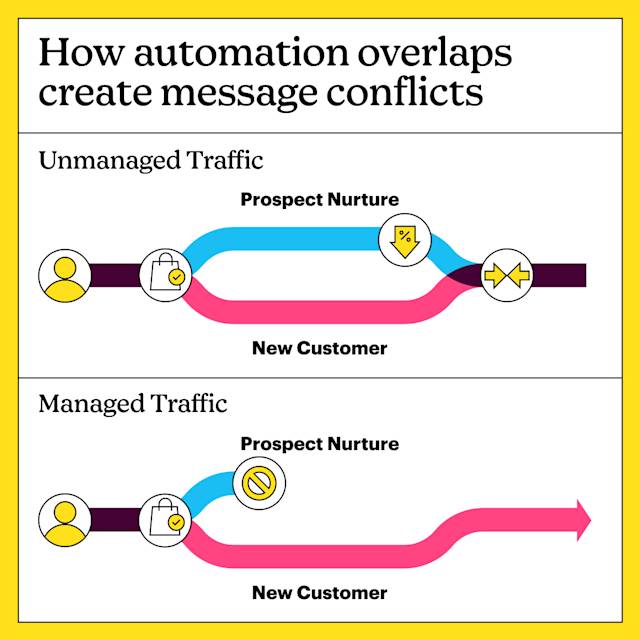
Traffic management is the key to profitable email marketing automation. You need it when your segments come into conflict with each other. For example, you don’t want to confuse established customers by sending them a string of welcome offers. In this instance, you would need a rule that automatically moves “new” customers to a “loyal” or “regular” segment when they have purchased more than once.
Fix segmentation overlap
If your segmentation logic allows for too much overlap, customers may become less engaged with your communications. Sending an email to 2 segments that include the same customer can quickly clutter their inbox, despite your best intentions. Over time, this can cause message fatigue, leading to a decline in opens and clicks.
In some cases, the overlap can create meaningful friction in the experience. A customer might buy an item at full price but remain in your prospect nurture stream, resulting in a welcome discount offer for the same item.
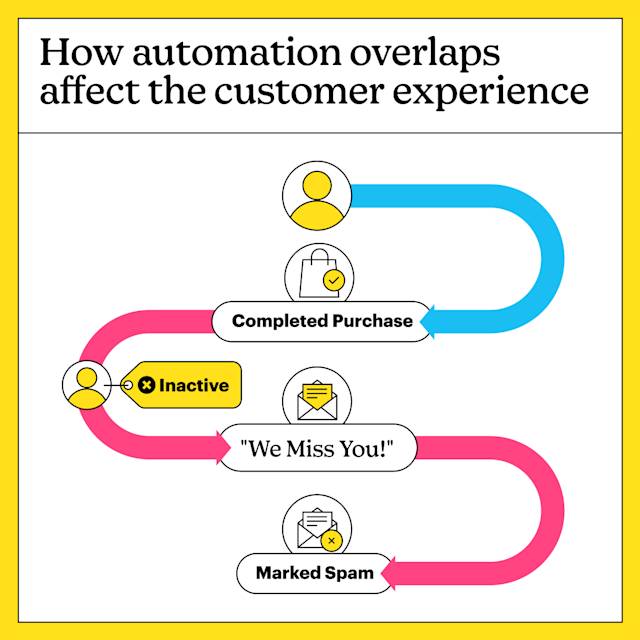
You probably wouldn’t see an instant reaction. A few customers might complain, but the real problem lies in the gradual erosion of trust and goodwill that makes customers drift away.
Review and refine segments
When you’re designing your segments and automation workflows, you have to make some distinctly human judgment calls. When does a “new” customer become an “existing” one? What makes a customer “loyal”? These questions get more nuanced as your business grows.
Mary Chapman, Media and Mail Order Manager for our customer Formaggio Kitchen, explains how smart segmentation keeps customers engaged: “[Segmentation] helps us to prevent unsubscribes because people aren’t just getting swarmed with emails. We can send out more than we might normally send if they were all just going to the same place—they won’t feel spammed because it’s more targeted.”
Use human insight to scale
As your customer database expands, you’ll see more variation in how people engage with your communications. New segmentation opportunities will emerge, sometimes grouping long-established customers alongside brand new ones.
You’ll learn more about how new products or offers resonate with different people. Over time, this allows your workflows to become more advanced, drawing on richer insights into how customers respond.
Your marketing automation tool will gather the data for you—but it’s up to you to make sense of the information and apply it to new segments and workflows. That’s why your tech stack still needs human guidance: you understand your audience in ways automation never could, so the triggers that move customers into and out of segments and workflows should be your call.
Add time-based conditions
With some Mailchimp plans, you can use time-based conditions to automatically manage segment membership. For example, you might create a segment for new customers that only includes contacts whose signup date falls within the last 30 days. Once that period ends, the logic you set up should move contacts from the “new customer” segment into an “existing customer” segment—while ensuring they aren’t members of both segments at the same time.
That’s not to say that your established customers would respond well to a constant stream of emails. To avoid over-messaging, you need time-limited “Do Not Send To” rules, which exclude recent purchasers from your scheduled, generic campaigns.
Ultimately, this is where human insight and judgment come into play. Your tech stack can provide the data that informs smart decision-making—but it’s up to you to turn that data into meaningful management intelligence, and to use it to shape the logic behind your automation.
Get customer support
The finer points of managing customer workflows can seem daunting at first. That’s why customer support is a fundamental part of our plans.
If you have 30,000 contacts or more, you can call upon Mailchimp’s Customer Success Management team—real people with real expertise who are familiar with your account history. You’ll receive one-on-one consultations to identify your business needs, establish new goals, and create a personalized success plan—starting with a review of your current marketing efforts and followed by milestone check-ins to assess progress, share industry updates, and recommend next steps.
“It has been a huge benefit to work with a CSM because it helps us get the most out of the platform (Now we know all we can do!), create a plan where we can improve our numbers, and also the help/support to all of our ideas.”
Design for customer loyalty
As your business grows, it’s inevitable that your marketing needs will evolve. More customers mean more opportunities—but also more records to manage and more segments to design. At the same time, you’re competing in saturated markets where achieving real differentiation can be difficult, and even a single segmentation conflict can disengage customers who were previously loyal. That’s why you need an architect on your side, not just a technical troubleshooter.
It’s the difference between a functional platform for sending emails and a strategic asset that helps nurture long-term customer relationships. With Mailchimp, you have a platform designed to scale with your needs, along with the dedicated support required to plan for continued growth.
Send messages that matter
If you want to help build lasting, trust-based relationships, the quality of your messages—and their relevance and value—matter most.
There’s a technical aspect to this as well. Poorly conceived email marketing can turn away previously loyal customers, and as your business grows, weaknesses in your systems become increasingly difficult to identify and correct.
Segmentation and personalization are key, and it’s never too late to start building a strategic structure into your customer database. Great customer experiences require design and planning, and once the logic is in place, you create a virtuous cycle of marketing performance and business growth.
Choose the right platform
Switching to Mailchimp is a strong first step. You get a sophisticated automation platform with plans designed to match your business needs, scaling and adapting as you grow. Most importantly, you gain access to experts who can help you build a strategy-driven platform that minimizes revenue loss and maximizes long-term profit.
Next steps
Download the Automation Audit Checklist. It outlines 3 key measures you can apply to your marketing automation setup to identify areas of potential conflict and confusion, along with recommended steps to get everything working as you intended.