ANALYTICS & REPORTING TOOLS
Marketing analytics reporting across every channel in one place
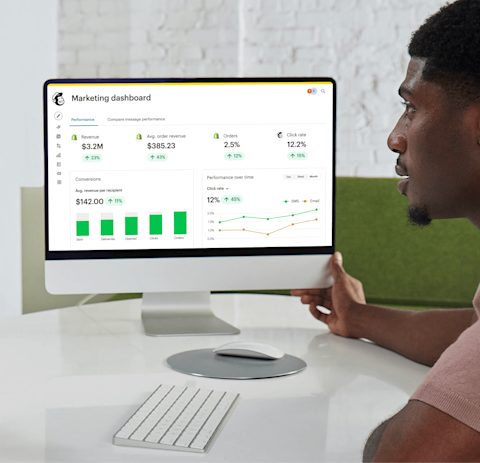
Go from high-level trends to granular insights with our analytics tools. Understand your audience, measure your ROI, and uncover new opportunities to drive conversions.

Find out why we’re best-in-class
The #1 AI-powered email marketing and automations platform* that recommends ways to get more opens, clicks, and sales.
-
Up to 30x ROI
seen by Mailchimp users*
-
>99% deliverability rate
for email (average)
-
11M+ users
of Mailchimp globally
-
50+ behavior-based triggers
for personalization
Understand performance from first click to final sale

NEW: Our AI-powered analytics just got better
Learn more about your audience with tools like the Mailchimp site tracking pixel, then use analytics AI to understand what it all means—and what you can do to drive growth.
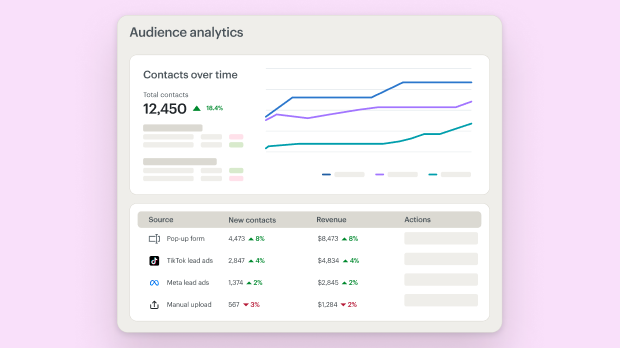
Refine your acquisition strategy
Track audience growth over time to gain a deeper understanding of where your most valuable customers are coming from.
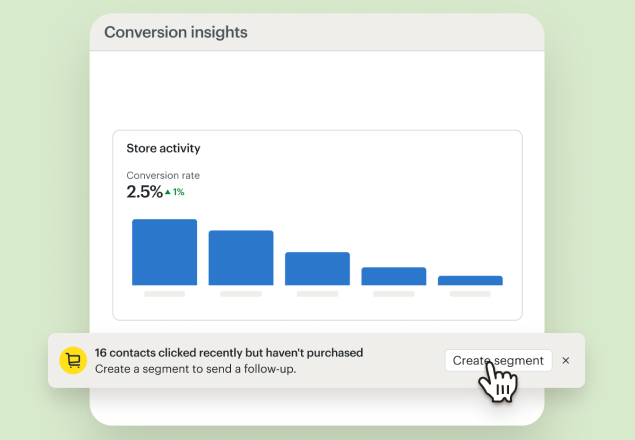
Boost campaign ROI by prioritizing what works best
Follow the customer journey from interest to purchase to get insights on the most meaningful opportunities to drive conversions.
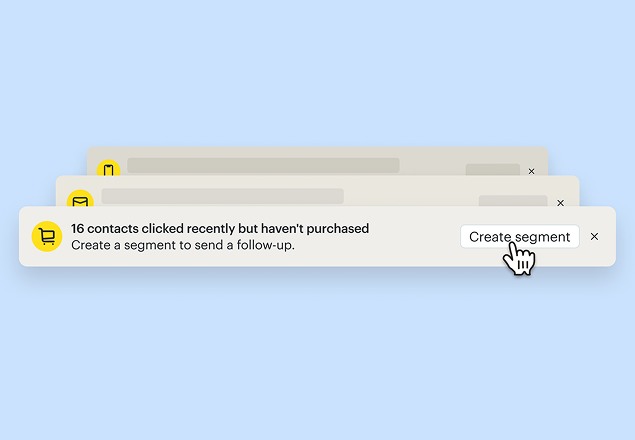
Find out what makes your customers tick with personalized recommendations
Intelligence-backed tools with serious sales muscle
Our AI-powered platform uses millions of data points from similar businesses to help you optimize content and drive conversions.
Bring in more data, drive more growth with our integrations
-

Canva
Create compelling visuals for your marketing.
-

Mailchimp for Salesforce
Sync your Mailchimp subscribers and Salesforce® leads across platforms.
-

Instagram
Promote and share your Instagram posts in email campaigns.
-

Shopify
Sync Shopify customers, products, and purchase data to Mailchimp.
-

Google Analytics
Unlock powerful insights with campaign, website, or landing page data.
-

WooCommerce
Power your ecommerce store with smart marketing features.
-

QuickBooks Online
Bring together your marketing tools and invoice data.
-

Squarespace Commerce
Market your ecommerce business and drive sales.
-

Zapier
Automatically pass data between web services without a single line of code.
"Mailchimp's reporting tools and campaign dashboard were a big part of what motivated me to change our email strategy... Mailchimp made it easier to see our performance and make changes to strategy."
Lauren Korus, Content Manager, Vacation Races
Get a headstart with a personalized product tour
Start using your new tools with confidence thanks to one-on-one support from an onboarding specialist—part of every Premium and Standard plan.*
Onboarding services video
Make smart decisions faster with access to all of your data in one place

Make data-driven decisions
Easily compare and analyze data across channels, build insightful reports and visualizations, and get crucial granular insights.
Optimize your campaigns to maximize effectiveness

Put your content to the test and see what really works
Use multivariate and A/B testing to gain data-driven insights that help you understand how small changes drive improved engagement.
Get started today
†See Free Trial Terms and Offer Terms.
Overagesapply if contact or email send limit is exceeded. Free plan sending will be paused if contact or email send limit is exceeded. Learn more.
Learn more about reporting and analytics



Additional reporting and analytic topics
-
How to Calculate Email and SMS Marketing ROI
Turn data into decisions. See how to calculate the ROI of email marketing and SMS to justify your budget and discover new opportunities for growth.
-
Email & SMS Analytics Tools for Growth
Track email and SMS performance in real-time to fix underperforming campaigns and tie every message directly to revenue. Scale what works.
-
What is Revenue Attribution? A Guide for Marketers
Revenue attribution tells you exactly which emails and texts are driving sales so you can spend more on what works and cut what doesn't.
-
How to Use Automation for Customer Retention
Stop customer churn before it starts. Use customer retention automation to nurture your audience and increase lifetime value with perfectly timed messages.



Need to hire a helping hand? We got you.
From a quick template design to full-service campaign management, our global community of 850+ trusted experts does it all.

We offer expert 24/7 customer service
Our customer service team is always available and ready to support you.
FAQs
-
Marketing reporting tools are software that collects data from your campaigns, organizes it, and presents it in a format you can actually act on. Instead of manually pulling numbers from multiple platforms and trying to make sense of them in a spreadsheet, reporting tools do that work for you, surfacing the metrics that matter in one place.
For campaign decisions, this is valuable because you can see at a glance what's performing well, what needs attention, and where your audience is most engaged. Good reporting tools don't just show you data; they help you understand what to do with it.
Mailchimp's platform keeps you current with real-time campaign stats, AI-assisted content optimization, actionable audience insights, and benchmarking that compares your performance against others in your industry. For a broader look at how reporting fits into your overall stack, see our guide to essential digital marketing tools.
-
Mailchimp provides reporting across every major marketing channel in one platform:
- Email campaign reports: open rates, click rates, revenue, unsubscribes, and deliverability data
- Automation reports: series-level performance and individual email stats within a flow
- Landing page reports: views, clicks, signups, and revenue generated
- Ad reports: performance data for your Facebook and Instagram campaigns
- Social post reports: reach, impressions, and engagement across your published posts
- Audience reports: contact growth, demographics, location, and engagement trends
- E-commerce reports: purchase stats, conversion rates, and return on ad spend
You can explore the full reporting feature set on our analytics and reporting overview.
-
Reporting collects and presents data in a clear way, giving you a snapshot of what happened. Analytics goes deeper, finding patterns in that data and helping you understand what it means and what to do next.
A report might tell you how many people opened your last email and how many clicked through to your site. Analytics might then identify that most of those clicks came from a specific segment, and suggest that future campaigns lean harder into that audience.
In Mailchimp, both are built into the same platform. You get clear, readable reports on past performance alongside tools like A/B testing, benchmarking, and predictive segmentation that help you turn those findings into better campaigns.
-
Marketing analytics reporting combines the two disciplines into a single workflow. It's the process of tracking metrics, measuring performance across channels, and surfacing insights that connect data to decisions.
Rather than treating reporting and analytics as separate activities, a good platform handles both together so you can move from "here's what happened" to "here's what to do about it" without switching tools.
In practice, this means monitoring things like open rates and revenue alongside trend data, audience behavior patterns, and AI-powered recommendations, all within the same dashboard. If you want to go deeper on how this applies to content specifically, our guide to measuring content marketing performance is a useful companion.
-
Mailchimp starts collecting data as soon as your campaign is published and your audience begins engaging with it. Keep in mind that results may not appear instantly since emails can take time to send and be delivered, but data will accumulate as opens, clicks, and purchases come in.
To view a campaign report, open the Campaigns tab and select the report for any active or completed campaign. The overview includes key metrics like open rate, click rate, total revenue, and unsubscribes.
For automation reports specifically, go to Reports, click Automations, then select View Report to see both series-level performance and stats for each individual email in the flow.
-
Yes. Mailchimp's marketing dashboard consolidates performance data from email, social posts, ads, landing pages, and automations into a single view, so you're not jumping between separate tools to understand how your marketing is performing overall.
Our guide to building an effective marketing dashboard covers the key principles worth knowing before you set yours up. Mailchimp also integrates with Google Analytics, which lets you layer website behavior data on top of your campaign data for a more complete picture of the customer journey from click to conversion.
If you're evaluating standalone options, we've also compared the leading website analytics tools to help you decide what fits your stack.
-
Predictive analytics uses historical data and statistical modeling to forecast future behavior. Rather than reacting to what already happened, it helps you anticipate what's likely to happen next so you can act ahead of it. For a deeper primer, our guide to how AI powers predictive analytics explains the underlying concepts clearly.
Mailchimp offers predictive analytics in the form of predictive segmentation, which identifies contacts based on their likelihood to engage or make a purchase.
This means you can target people who are most ready to buy with a well-timed message, rather than sending the same campaign to your entire list and hoping for the best. It's one of the features available on Standard and Premium plans.
-
Automated reporting means your campaign data is collected and organized continuously as your marketing runs, without any manual effort on your part.
Once tracking is enabled in Mailchimp, reports generate automatically as your campaigns go out and your audience engages with them. You can access your reports on demand at any time from the Campaigns tab, or set up notifications to stay on top of performance without having to log in to check.
This is especially useful for automation flows, where emails send on a rolling basis and performance data accumulates over time rather than all at once. If you're still figuring out which tools belong in your reporting setup, our overview of data analytics tools is a good place to start.
Millions of users trust us with their email marketing. You can too.
*Disclaimers
- 30X ROI: Based on all e-commerce revenue attributable to paid plan users’ Mailchimp campaigns from August 2024 - August 2025. ROI calculation requires an e-commerce store that is connected to a Mailchimp account. Results vary.
- Personalized Onboarding: Onboarding services differ per plan and are available for new or upgraded users with a paid plan for the first 90 days after account creation or upgrade. Onboarding services are currently offered in English, Spanish and Portuguese for Premium plans, and in English for Standard plans.
- Availability of features and functionality varies by plan type. For details, view plans and pricing.
†Free Trial Terms: The first fourteen (14) days of subscription to Mailchimp Standard or Essentials (as applicable, each, a “monthly plan”), starting from the date of enrollment, is free (“Free Trial”). Valid payment information must be provided at the time of enrollment. You will be notified via e-mail of the approaching expiration of your Free Trial prior to the expiration date. To be eligible for the free trial offer, you must be a new Mailchimp customer or an existing Free Marketing Plan customer with an account created within the last 90 days in select countries and sign up for a Standard or Essentials plan using the "Start Free Trial" option (or similar wording). Offer is limited to one per Mailchimp account and cannot be combined with other Mailchimp offers and offers are not eligible to be applied consecutively. Offer is available for a limited time only and does not apply to add-on fees or one-time fees, including but not limited to transactional email (fka Mandrill) charges, SMS Marketing, Website plans, pay as you go credits, or Google ads. Once the Trial Period ends, you will be charged on a monthly or annual basis, as applicable, at the then-current rate for the paid marketing plan you have selected based on your contacts and emails sends until you cancel, change to a different paid monthly or annual marketing plan, or change to a Free Marketing Plan. If you purchase an annual Paid Marketing Plan while on a free trial, your free trial will immediately terminate upon purchase. See full offer terms. Terms, conditions, pricing, special features, and service and support options subject to change without notice.